June 09, 2026, 11:51:05 PM
| Chapter 2: Creating The Game | ||||
| Now we will get started with SCI Studio.
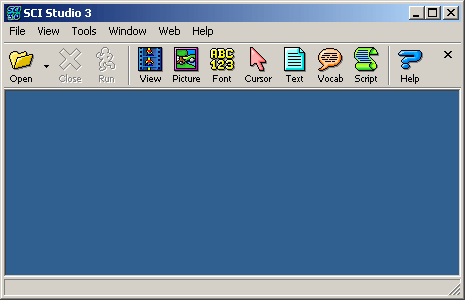
First, run SCI Studio. It will load with the main menu and toolbar as shown below.
| ||||
| Getting Started | ||||
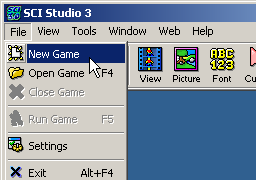 |
The toolbar gives quick access to opening, closing and running games, the resource editors, and the help file. To create your game, begin by clicking on the "File" menu, selecting "New Game". From there, a new game dialog will appear. |
|||
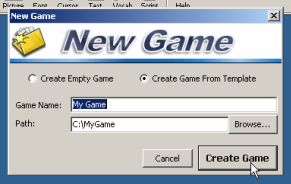 |
You can select a name for your game or leave the field as it is. You can also chose whether or not you want to create a game from the template. You will generally always want to it from the template, otherwise your game will be completely empty! Choose the directory where you want your game to be located. You can enter the directory in the text field, or click on the "Browse..." button and a directory selection dialog will appear. If the directory you enter does not exist, SCI Studio will create it for you. Click the "Create Game" button when done and the Game Explorer will load up. |
|||
| The Game Explorer | ||||
|
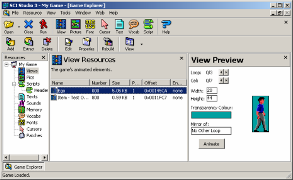
The Game Explorer gives you the ability to handle SCI resources and their packages. You can add, extract, and delete the resources in the packages. There are three main areas in the explorer: the Resource Type List, the Resource List, and the Preview Bar. The Resource Type List displays a list of the SCI resource types. By clicking on their names, you select the list of resources to view. At the top of the list is your game project name, which can be changed by clicking on it. The Resource List displays a list of the resources currently in the package. You can select which one(s) to extract, delete or edit with the toolbar buttons, or by right clicking. Double clicking will also allow you to edit it. The Preview Bar displays a preview of the selected resource. This can be hidden if you prefer. Just click on it's "X" button. To show it again, select from the menu "View" then "Preview Bar".
|
|||
| Running The Game | ||||
 |
To run your game, simply click on the "Run" button in the main toolbar. It will execute the game, and when you quit, come right back to SCI Studio. | |||
| Now that you are familiar with the resources and Game Explorer, you can start working with game files! | ||||
| ||||