June 09, 2026, 11:55:02 PM
| Chapter 24: Using The Print Procedures | ||||
|
The print procedures allow you to print message boxes. These are most commonly used to simply print messages throughout the game, but they are also used for things such as the quit dialog, death dialog, and more! They can do far more than print messages. They can have buttons, title bars and icons. You can set their width, font, coordinates and more! There are five different print procedures, each with their own purpose. They are Print, IconPrint, EditPrint, GetNumber and FormatPrint. | ||||
| The Print Procedure | ||||
|
The Print procedure prints a message box on the screen. It can take a virtually unlimited amount of parameters. Each parameter starts with it's name then it's subparameters. Here are some examples. | ||||
 |
Printing a Plain Message Code:
Print("Hello World")
|
|||
 |
Printing a Message With a Title Code:
Print(
"Hello World" #title "This is the title!" ) |
|||
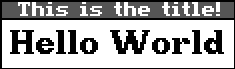
| Changing The Font Code:
Print(
"Hello World" #title "This is the title!" #font LARGE_FONT ) |
 |
Printing With An Icon: in this case view.000 loop #0, cel #0 Code:
Print(
"Look! It's an icon!" #title "An Icon Print!" #font LARGE_FONT #icon 0 0 0 ) |
|
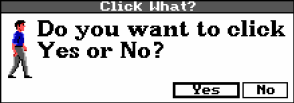
| Printing With Buttons Code:
(var button)
When specifying the buttons, you give their name, and then their number ID.
It then returns the ID of the button clicked. In the example, we check which
button was clicked, then display another message box stating which button
the player clicked.
= button Print( "Do you want to click Yes or No?" #title "Click What?" #font LARGE_FONT #icon 0 0 0 #button " Yes " 1 #button " No " 0 ) (if(== button 1) Print("You clicked YES") )(else Print("You clicked NO") ) |
|||
|
That sums up the print procedure. For more detailed information on it, and the others available, see the section in the SCI Studio Help File. | ||||
| ||||